If you are looking for an OpenAI Chatbot for WordPress, you probably want something simple to install, flexible enough to match your site, and powerful enough to answer real visitor questions.
That is exactly where KimaAI fits in. KimaAI is a WordPress plugin built to connect your website with modern AI providers and turn that connection into a practical AI assistant or AI chatbot for your visitors. It is designed for both non-technical site owners and developers who want deeper customization.
KimaAI is especially relevant if you want an OpenAI chatbot for WordPress free to get started, while still having room to scale into more advanced setups later. The plugin has a free version, while Pro plans unlock additional features, updates, and support.
KimaAI also uses a bring-your-own-API-key model, which means AI provider costs are separate from the plugin itself. You can read about it in more detail here → How to Add AI Chatbot to WordPress Using Your Own API Key
What Is KimaAI?
The KimaAI WordPress plugin is an AI chatbot plugin for WordPress that helps you add an AI assistant to your website in just a few steps. KimaAI is a WordPress AI assistant and AI chatbot plugin focused on customer support, user engagement, and content-aware responses.
KimaAI works as a connection layer between WordPress and external AI providers such as OpenAI and Replicate, giving you a control panel inside WordPress to manage AI services, presets, chatbot settings, and more.
In simple terms, KimaAI helps you build a chatbot that does more than give generic AI answers. It is meant to understand your website, guide visitors toward useful pages, and support conversations that feel more relevant to what people are actually viewing.
Why Website Owners Want an OpenAI Chatbot for WordPress
A modern website needs more than a contact form. Visitors expect fast answers, product guidance, and help finding the right content. That is why demand keeps growing for the Best AI Chatbot Plugins for WordPress and the best free chatbot plugin for WordPress.
An AI chatbot can help you:
- answer common pre-sales questions
- support visitors 24/7
- reduce repetitive support requests
- keep users engaged longer
- guide people to the right product, service, or article
- create a smoother experience for blog readers, store visitors, and leads
KimaAI is positioned around exactly these use cases.
Why KimaAI Stands Out
There are many tools competing for the title of WordPress chatbot plugin free or best WordPress chatbot plugin, but KimaAI stands out because it combines ease of use with deeper control.
1. Fast Setup Inside WordPress
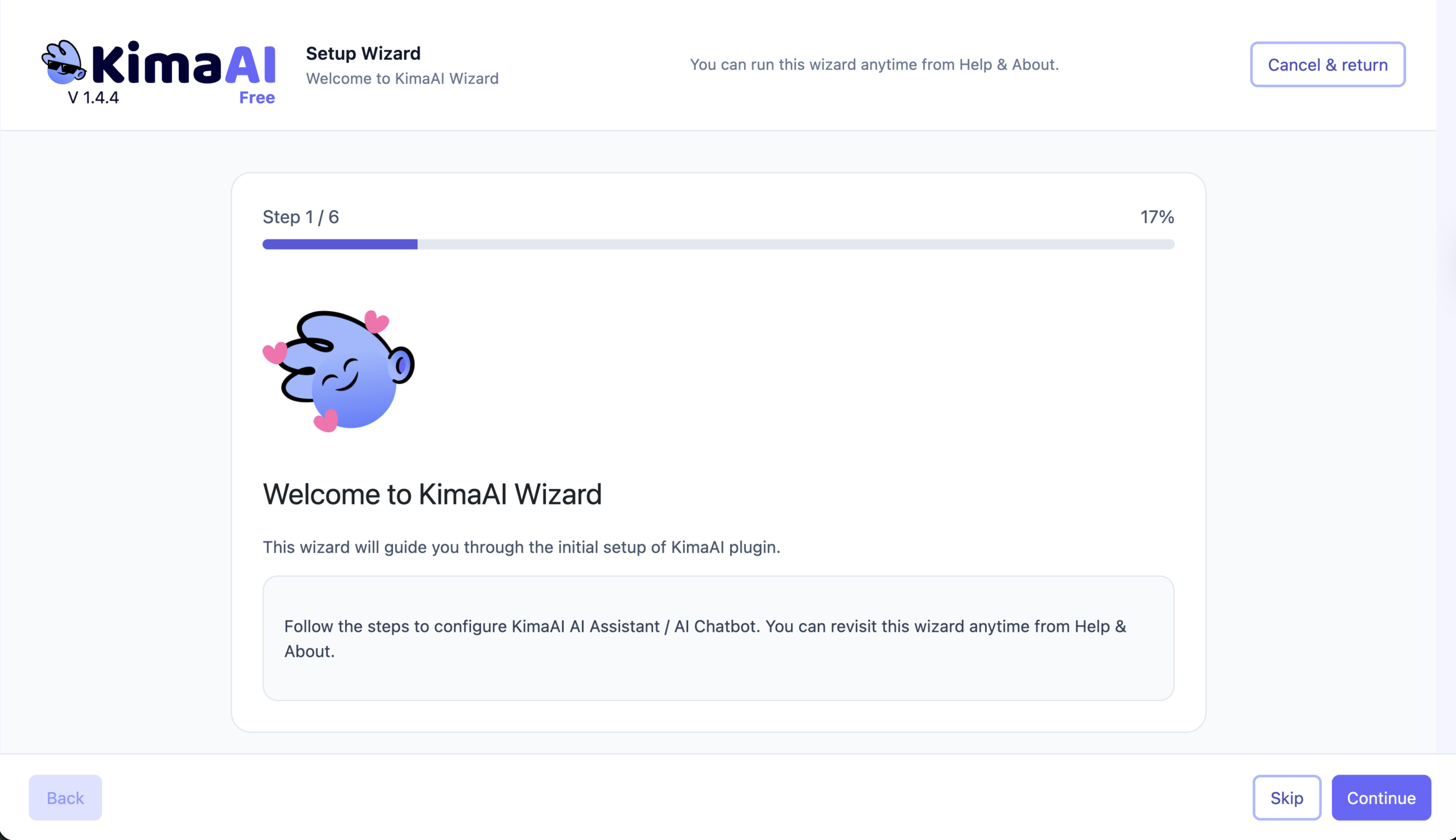
KimaAI can be installed directly from the WordPress plugin screen by searching for “kimaai,” clicking install, and activating it. After activation, the plugin launches a setup wizard designed to help users complete the process as quickly as possible.
2. Works With OpenAI and Other Providers
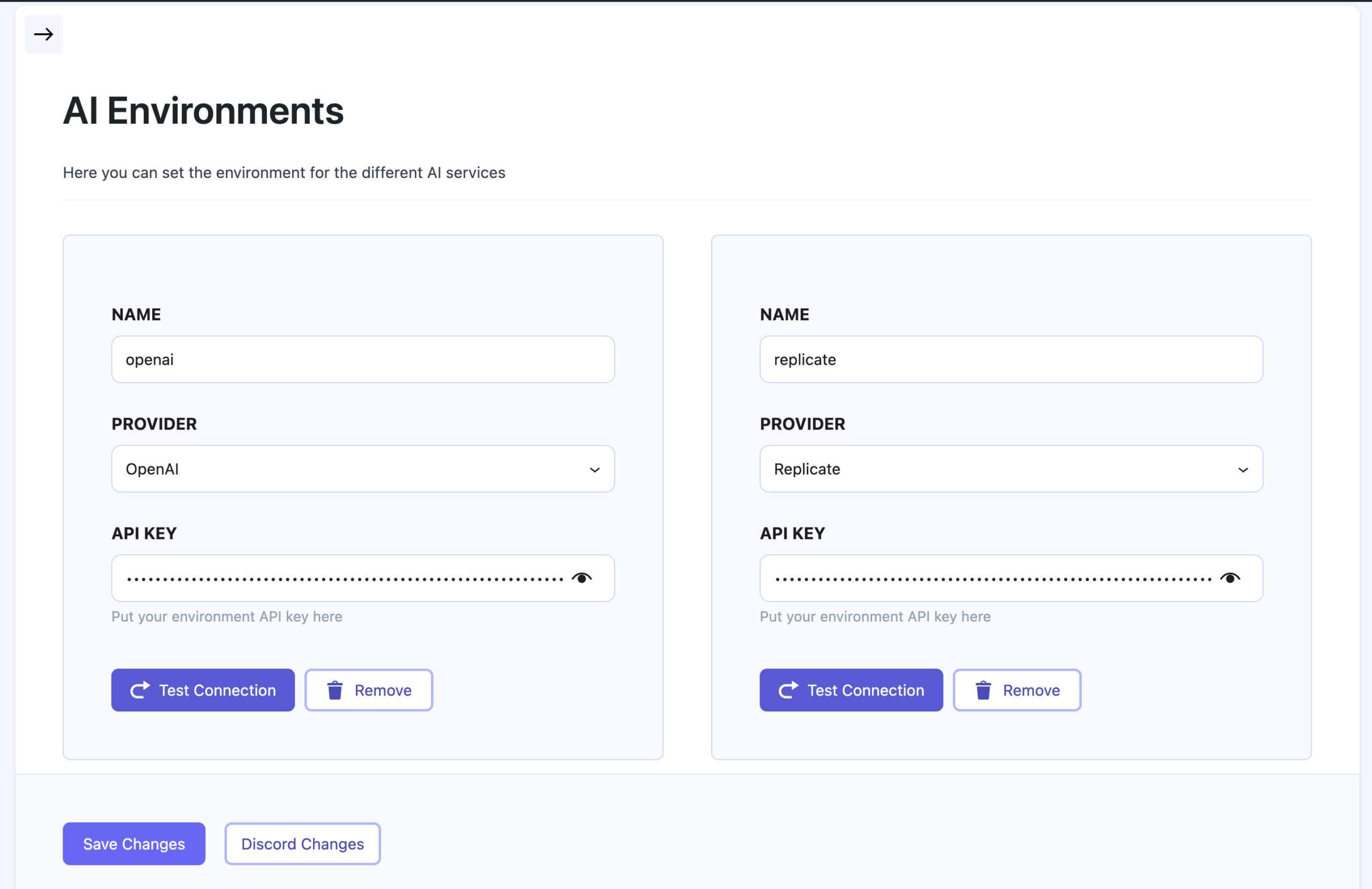
If your main goal is an OpenAI Chatbot for WordPress — Helper, KimaAI supports that workflow directly. You can configure OpenAI in the AI Services area by adding your API key and creating an AI environment. It also supports multiple AI providers, including Replicate, which gives users more flexibility for future workflows.
3. Content Awareness for Better Answers
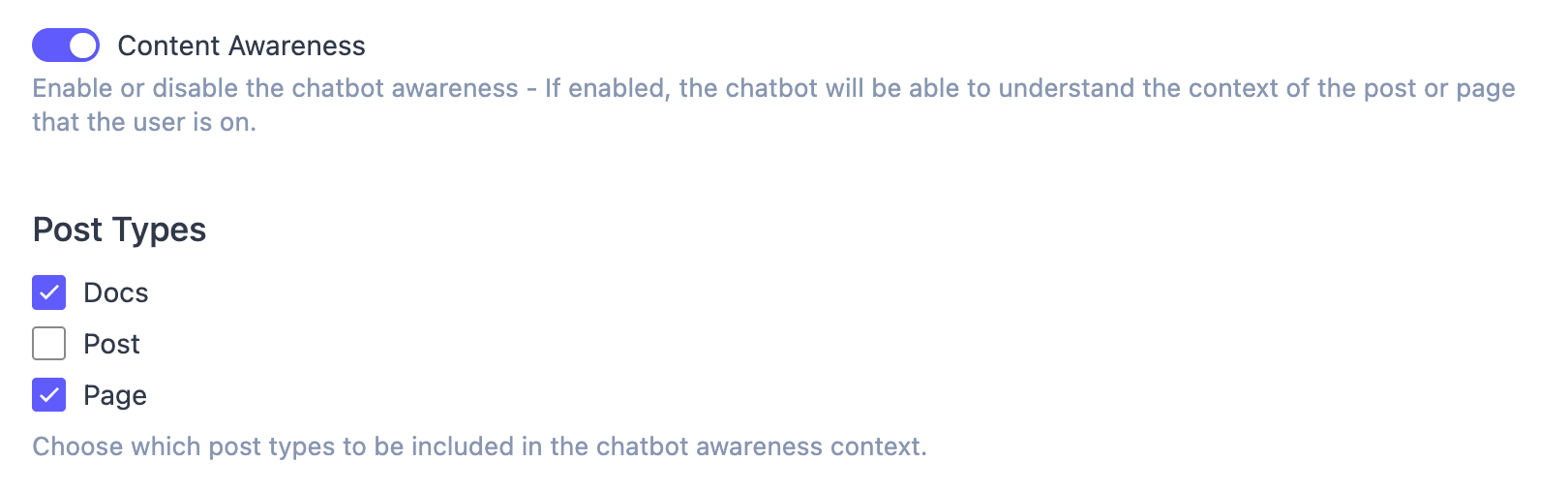
This is one of the most interesting parts of KimaAI. Its Content Awareness feature helps the chatbot understand the specific page or post a visitor is currently viewing. That means the assistant can respond with page-level context instead of defaulting to broad, generic replies. This is useful for product pages, documentation pages, blog posts, landing pages, and help center content.
4. Customization for Branding and User Experience
KimaAI includes a dedicated Chatbot Appearance area where you can control the global toggle, widget position, icon, colors, spacing, wording, and even an attention popover to draw more clicks. If you only want the chatbot on selected pages, the docs say you can disable the global toggle and use the kimaai_chatbot shortcode where needed.
5. Advanced Controls for Better Performance
The Chatbot Settings section lets you choose the AI provider and model, configure model-specific options, add chatbot instructions, enable content awareness, use function or tool calling, and work with more advanced controls such as vector database integration, user feedback, security settings, and GDPR consent options. This makes KimaAI attractive not only for beginners, but also for power users who want more than a basic chat widget.
Is KimaAI a Good OpenAI Chatbot for WordPress Free Users?
Yes, KimaAI is a strong option for users searching for an OpenAI chatbot for WordPress free because the plugin offers a free version and a setup flow that is clearly documented for beginners. The docs explain the installation, setup wizard, OpenAI configuration, and first chatbot build in a step-by-step way, which lowers the barrier for site owners who are new to AI.
That said, it is important to understand the pricing model correctly. KimaAI itself has a free version, but AI usage still depends on the provider you connect. You need your own API key from the provider you choose, and any usage fees are paid to that provider, not to KimaAI.
How to Set Up KimaAI on Your WordPress Website
If you want a quick overview, here is the basic flow to get up and running with KimaAI:
Step 1: Install the Plugin
Go to your WordPress dashboard, open the Plugins screen, search for “kimaai,” install the plugin, and activate it. If you need more info, check this document page → How to Install and Activate KimaAI Plugin
Step 2: Open the Setup Wizard
After activation, KimaAI shows a setup wizard designed to help you finish setup quickly.
Step 3: Connect OpenAI
Create your OpenAI account, add a payment method on the OpenAI side, and then add your API key inside KimaAI’s AI Services settings. More info → Set up Your OpenAI Account and API Key
Step 4: Create an AI Environment
KimaAI lets you create AI environments and presets so your chatbot can use the provider and model you choose. More info → AI Services
Step 5: Launch and Test Your Chatbot
Once your AI environment and preset are configured, visit your website front end and test the chatbot with a simple message.
Step 6: Improve the Bot
Refine the chatbot instructions, enable content awareness, customize appearance, and decide where the widget should appear.
Who Should Use KimaAI?
KimaAI is a good fit for:
- bloggers who want smarter reader engagement
- businesses that want faster support responses
- WooCommerce stores that need help answering product questions
- agencies managing multiple WordPress sites
- developers who want hooks, filters, and extensibility
KimaAI is built for both site owners with minimal setup needs and developers who want hooks and internal APIs for custom AI workflows.
Is KimaAI the Best Free Chatbot Plugin for WordPress?
The answer depends on what you value most, but KimaAI makes a strong case if you are comparing options for the best free chatbot plugin for WordPress or the best WordPress chatbot plugin.
It is appealing because it offers:
- a free starting point
- OpenAI support
- a setup wizard
- multiple AI provider support
- content-aware responses
- branding and appearance controls
- page-specific placement with shortcode support
- room to grow into more advanced configurations
For users who want a practical AI chatbot plugin for WordPress rather than a simple scripted bot, KimaAI looks especially compelling because it focuses on grounding responses in your website’s own content.
Final Thoughts
If you are searching for an OpenAI Chatbot for WordPress, KimaAI is worth a close look. It gives WordPress users a way to launch an AI assistant with a relatively simple setup, connect OpenAI and other providers, customize the chatbot’s design and behavior, and improve response quality through content awareness and vector-based knowledge features.
For site owners who want an OpenAI chatbot for WordPress free entry point, KimaAI offers a practical starting path. For businesses and agencies that need more control, the Pro plans add broader licensing and extra support. Overall, KimaAI positions itself as a serious contender for anyone evaluating the best free chatbot plugin for WordPress, WordPress chatbot plugin free, or the best WordPress chatbot plugin for modern AI-powered websites.
FAQ
KimaAI is a strong option if you want a plugin that connects WordPress with OpenAI, includes a setup wizard, supports content awareness, and offers both beginner-friendly setup and developer extensibility.
Yes. KimaAI has a free version, but you still need your own API key and may have AI usage costs from the provider you connect.
Yes. KimaAI lets you adjust position, icon, colors, wording, spacing, and visibility settings, and you can also place it only on specific pages using shortcode support.
Yes. KimaAI includes Content Awareness so the chatbot can respond with context based on the page or post the user is viewing.