

Your AI provider bills by the token. Cost observability records the tokens your chatbot’s answers use, per day and per model, so you can see what the chatbot costs before the provider’s invoice arrives. With a monthly budget, KimaAI emails you once in a month as soon as that month’s usage passes it.
Set it up
- In the KimaAI admin, go to Settings → Usage and cost.
- Turn on Track token usage.
- Enter your Monthly token budget: the number of tokens a month may use before you hear about it. Leave it at 0 if you only want the figures.
- Enter the Budget alert email: the address that gets the alert.
- Select Save changes.
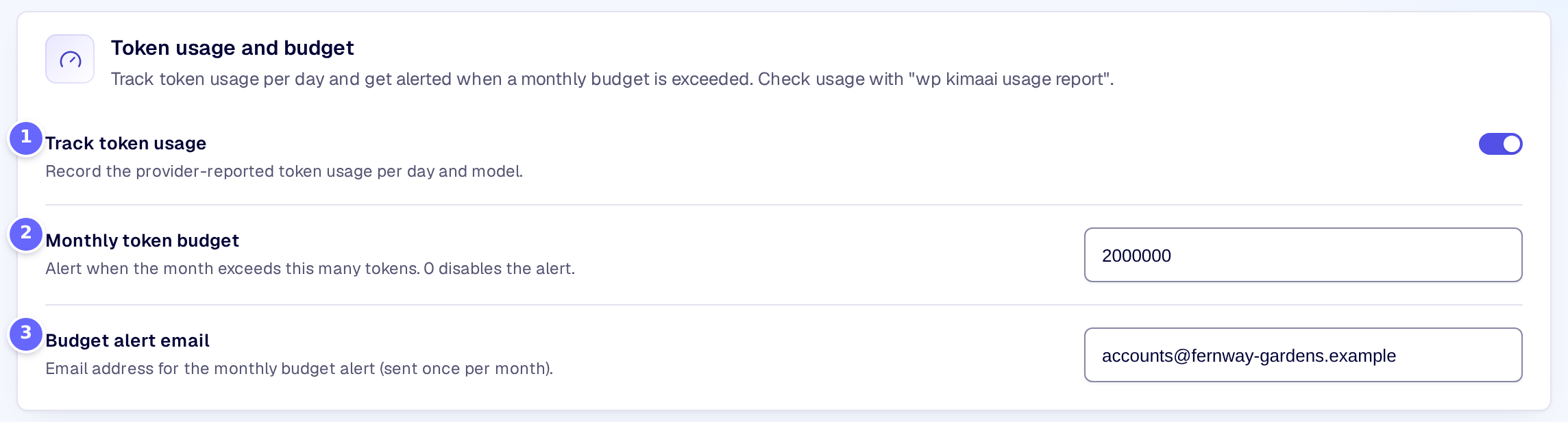
- Track token usage starts recording the usage of every answer.
- Monthly token budget is the limit for the alert.
- Budget alert email receives the alert.
To read the figures, run wp kimaai usage report on your server: it lists the input, output and total tokens and the number of answers per day for the last 30 days, then the total of the current month. --days=7 shows the last seven days instead.
Settings
Token usage and budget
| Setting | What it does |
|---|---|
| Track token usage | Records the token usage your AI provider reports for each answer of the chatbot, added up per day and per model. |
| Monthly token budget | The number of tokens a calendar month may use before the alert is sent. At 0 no alert is sent. |
| Budget alert email | The address that receives the alert. Without a valid address no alert is sent. |
How it works
- KimaAI records the usage that the provider reports with each answer the chatbot saves, streamed or not. Calls that report no usage are not counted, so tool rounds inside one answer and the embeddings of your content may be missing: treat the figures as close, not exact.
- The figures are kept for the last 90 days. Days and months follow UTC, not your site’s time zone.
- After each answer, KimaAI adds up the current month. When the total reaches the budget, it sends one email to the alert address, with the tokens used and the budget. It sends no second alert in the same month. If the email cannot be sent, it tries again after the next answer.
- Nothing stops the chatbot when the budget is passed: the alert is a warning, not a limit.
Troubleshooting
- The report says that no usage is recorded yet. Check that Track token usage is on, and that visitors have used the chatbot since you switched it on. Usage from before that is not recorded.
- No alert arrives. Check that the budget is more than 0 and the address is valid, and that your site can send email: the alert goes out through WordPress’s own mail function, like a password reset.
Related
- AI models: the model and limits that decide how many tokens an answer uses.
- WP-CLI commands: every
wp kimaaicommand, withwp kimaai usage report.