

Quality evaluation tests your chatbot the way a visitor would. Each test case is a question with what a correct answer must say and must not say. KimaAI asks the questions, checks the answers and records the score, by itself on a schedule or when you start a run. When the score drops below your threshold, it alerts you, so a change to your content, your settings or the AI model does not quietly make the answers worse.
Set it up
- In the KimaAI admin, go to Knowledge → Quality.
- Select New case.
- Enter a Case ID, a short unique name such as
delivery-costs, and a Category to group the results, such aspolicies. - Write the visitor’s question in Conversation turns. For a follow-up question, write each message on a line of its own.
- In Answer must include, write what a correct answer contains, one check per line. Separate words that are equally right with
|, for example£6.50 | £6,50. - In Answer must not include, write what a correct answer never says, one per line.
- Select Add. The case is saved at once.
- In the Scheduled runs section, turn on Run on a schedule, choose the Frequency, set the Alert threshold (%) and the Alert email, and select Save changes.
The cases and the runs are below the settings:
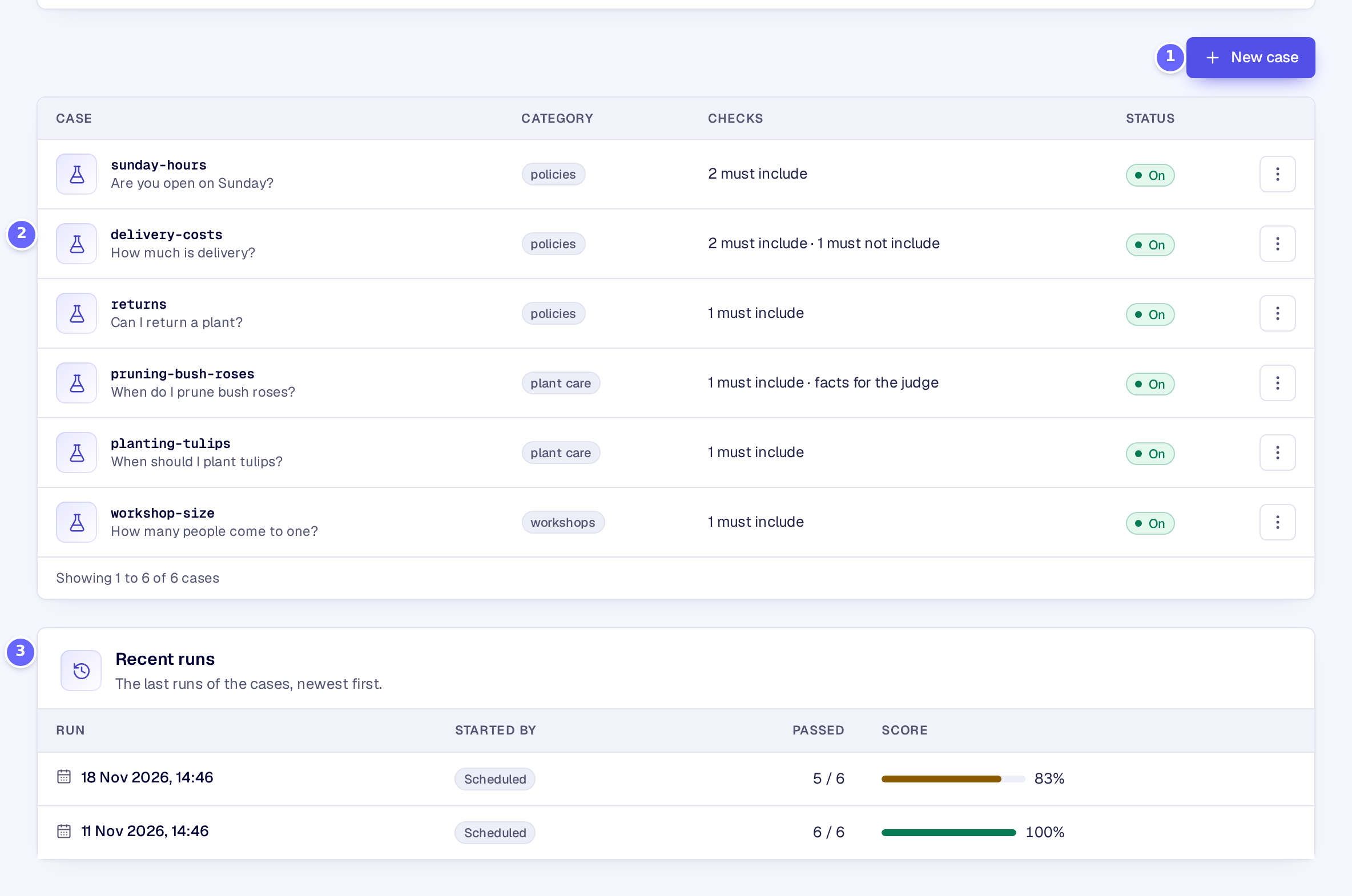
- New case adds a test case.
- A case: its ID and its last question, its category and its checks.
- Recent runs: the last runs, newest first, with who started them (the schedule, WP-CLI or MCP), how many cases passed and the score.
The schedule:
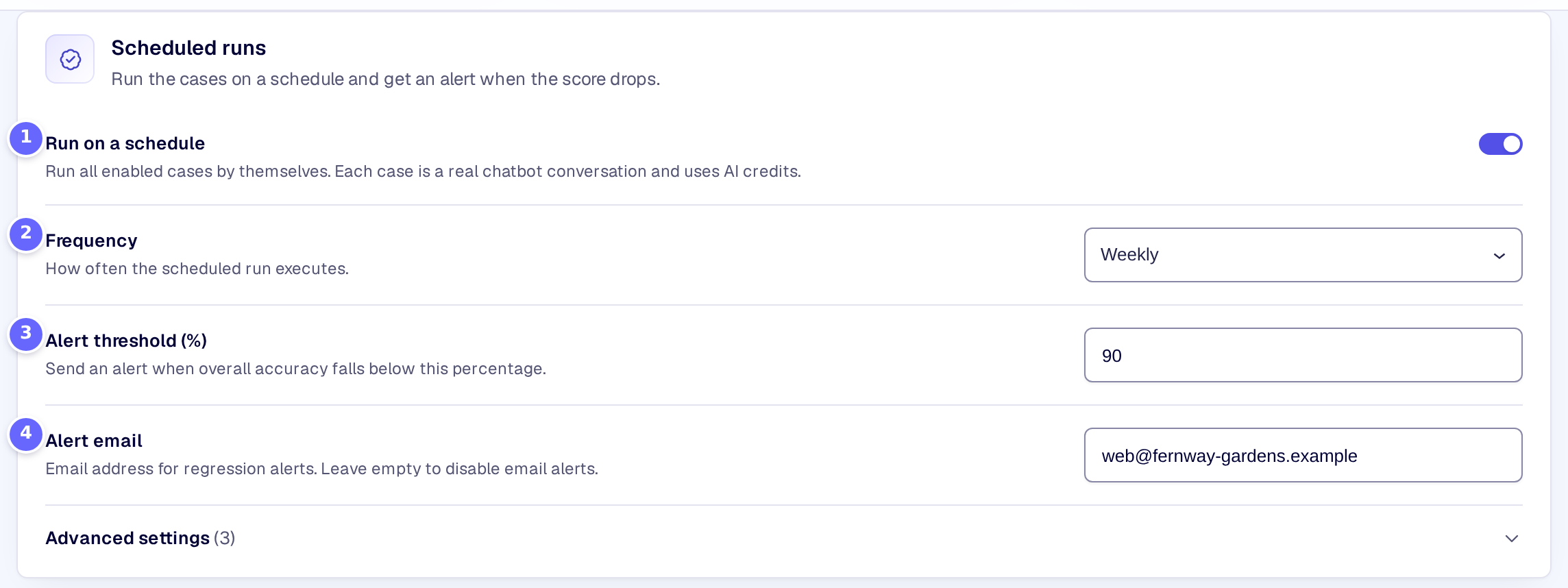
- Run on a schedule runs every case that is switched on by itself.
- Frequency: daily or weekly.
- Alert threshold (%): when the score drops below it, you get an alert.
- Alert email receives the alert.
After a run, the top of the page shows how it went:
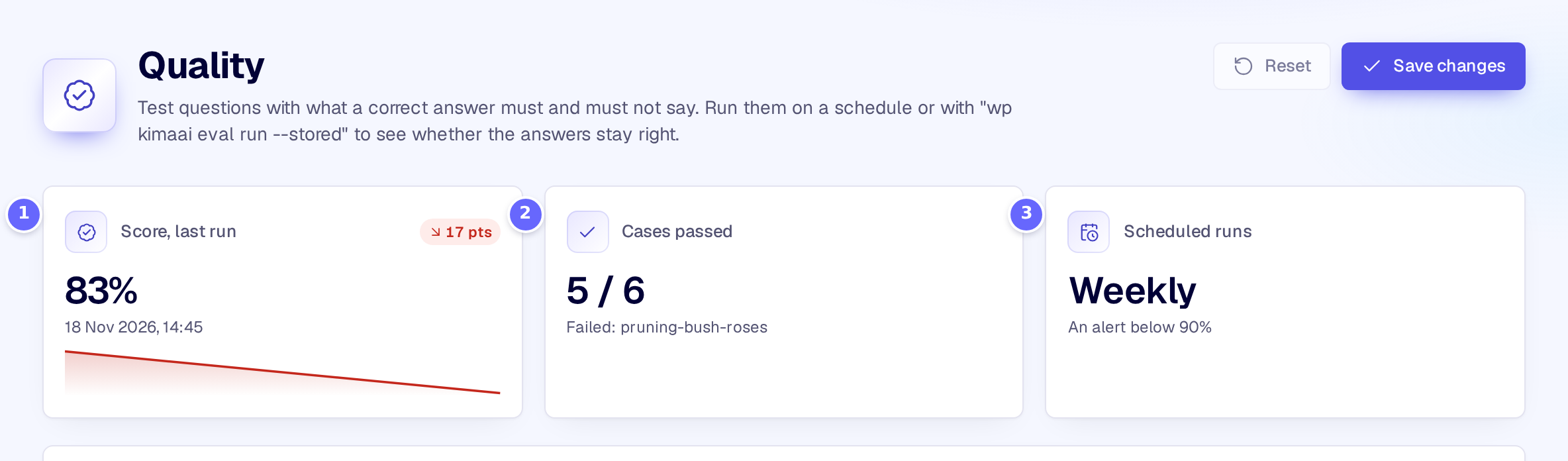
- Score, last run: the share of passed cases, with the change from the run before.
- Cases passed, with the cases that failed.
- Scheduled runs: the schedule and its alert threshold.
Every case is a real conversation with your chatbot and uses AI credits, so the page does not start runs itself. To run the cases now, use WP-CLI:
wp kimaai eval run --stored--only=<category> runs one category, --limit=<n> the first cases, --judge adds the LLM judge, and wp kimaai eval history lists past runs (WP-CLI commands).
Settings
Scheduled runs
| Setting | What it does |
|---|---|
| Run on a schedule | Runs all the cases that are switched on by themselves. Each case is a real chatbot conversation and uses AI credits. |
| Frequency | How often the scheduled run starts: Daily or Weekly. The default is weekly. |
| LLM judge | Also has the AI model grade each answer against the case’s expected facts: one more model call for each case that has them. |
| Request language | The language code sent with each question, such as de. Needed on multilingual sites, so the answers come from that language. |
| Alert threshold (%) | An alert is sent when the score of a scheduled run drops below this percentage. The default is 95. |
| Alert email | The address that receives the alert. Leave it empty for no email. |
| Alert webhook (optional) | A URL that receives the alert as a JSON POST, such as a Slack incoming webhook. |
LLM judge, Request language and Alert webhook (optional) are under Advanced settings in the section.
Test case
| Setting | What it does |
|---|---|
| Case ID | A short unique name for the case, shown in the results. |
| Category | A free name that groups cases in the results, such as terminology or products. The default is general. |
| Conversation turns | The visitor’s messages, one per line. Several lines test a conversation; the checks apply to the last answer. |
| Answer must include | One check per line that the answer must contain. A vertical bar separates words that are equally right. |
| Answer must not include | One text per line that the answer must not contain. |
| Expected facts (optional) | The facts a correct answer agrees with, for the LLM judge. |
| Enabled | A case that is switched off is kept but not run. |
How it works
- Each case starts a new conversation with your chatbot, with all its live settings: the model, the instructions, the knowledge base, the glossary and the pinned answers. The chatbot’s daily message limit does not apply to the test.
- The checks ignore upper and lower case and look for the text anywhere in the answer. A check with
|passes when any of its alternatives is there. A case passes when all its checks pass; an empty answer or an error fails it. - With LLM judge on, a case with expected facts is also graded by the chatbot’s own AI model: the answer passes when it agrees with the facts, even if it does not mention all of them.
- The score is the share of passed cases, overall and per category. KimaAI keeps the last 30 runs.
- When the score of a scheduled run drops below the threshold, KimaAI sends the alert: the email lists the failed cases with what failed, and the webhook receives the score, the threshold and the failed cases with the chatbot’s answers. The score drops when the scheduled run before was at or above the threshold, or when there was none. While the score stays below, the next scheduled runs send no new alert; after a run at or above the threshold, the next drop alerts again. Runs from WP-CLI or MCP send no alert and do not count as the run before.
- The test conversations never go to your team through human handoff.
- Developers can react to a drop with the kimaai_eval_regression action.
Troubleshooting
- A case fails although the answer is right. The check looks for the exact text: add the other ways of writing it with
|, such as9.90 | 9,90, or use the expected facts with the LLM judge. - No scheduled run happens. Scheduled runs use WordPress’s background tasks (Action Scheduler), which need visits to your site or a real cron job. Check Tools → Scheduled Actions for
kimaai/eval/scheduled_run. - The answers on a multilingual site are in the wrong language. Set the Request language.
Related
- Feedback: the questions visitors rated badly make good test cases.
- Pinned answers: fix an answer that keeps failing.
- Glossary: test that answers keep your approved wording.