

Function tools let the chatbot call PHP functions you write. When a visitor asks something your content cannot answer, such as whether a plant is in stock or what delivery to their postcode costs, the AI calls your function, gets its result and answers from it.
You write each function once in the admin, describe what it does, and choose which ones the chatbot may use.
Set it up
- In the KimaAI admin, go to Settings → Function tools.
- Select Add function.
- Enter the Function name: the name of the PHP function in your code, such as
check_plant_stock. - Write the Description: what the function does and when to use it. The AI reads it to decide when to call the function.
- Paste the whole function into Full PHP Function. Its parameters are what the AI fills in, and what it returns is what the AI reads.
- Leave Enabled on, and select Add.
- Under Allowed functions, tick the function in Allowed custom functions, and select Save changes.
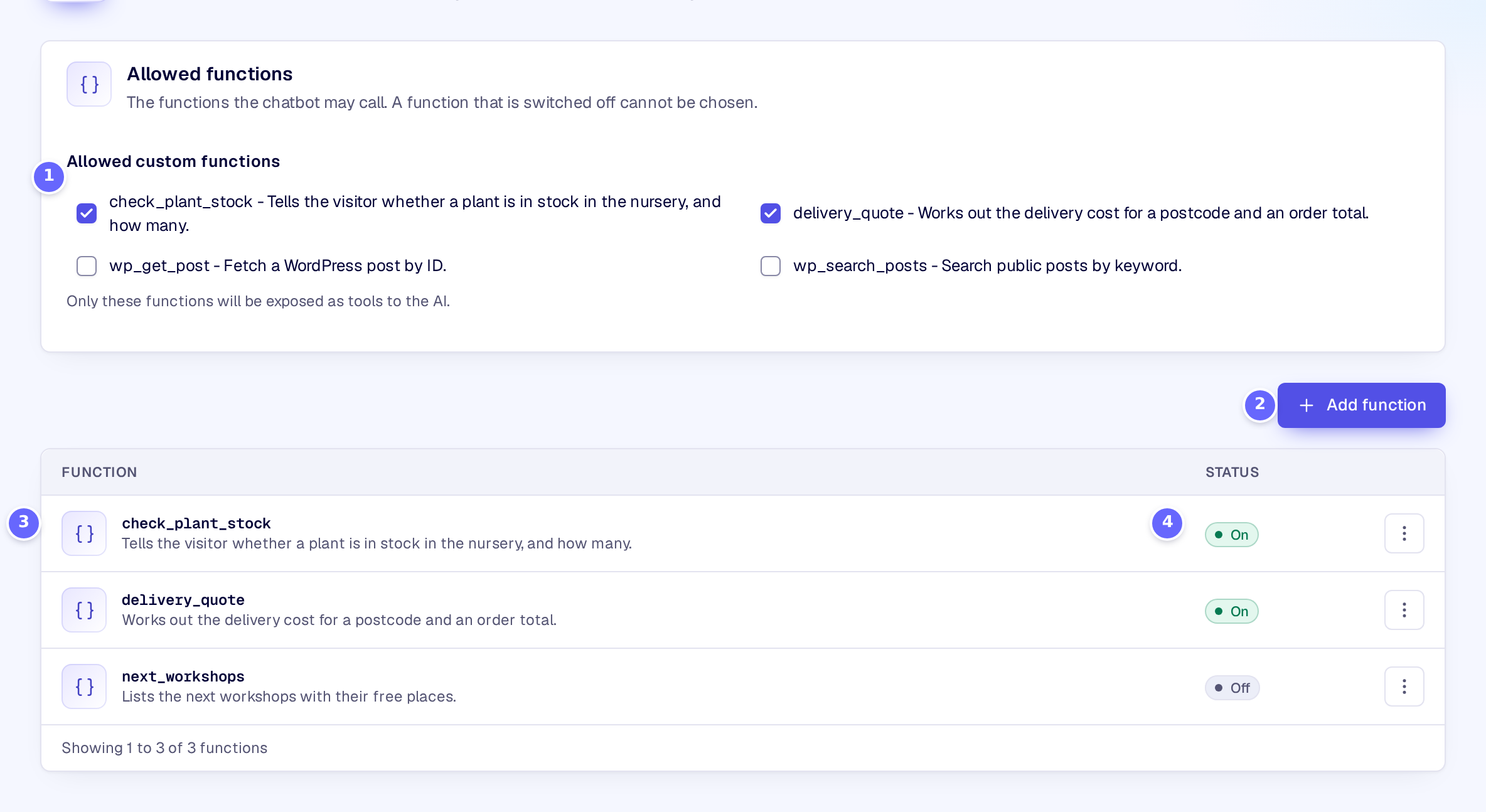
- Allowed custom functions: the functions the chatbot may call. Only enabled functions can be ticked.
- Add function opens a new function in a side panel.
- Each function with its name and description. Select a row to edit it.
- Whether the function is enabled.
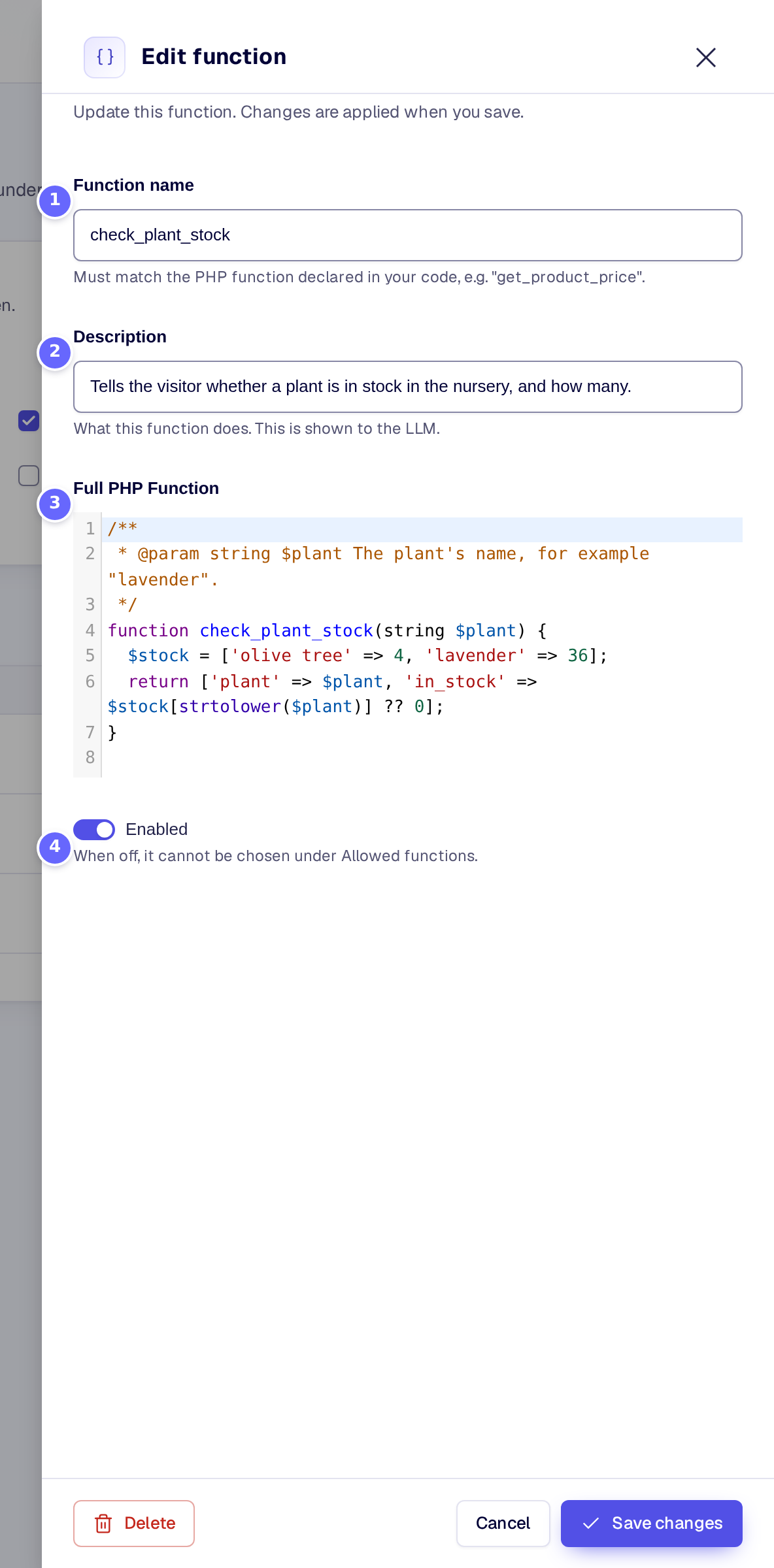
- Function name: must match the name of the function in the code.
- Description: what the AI is told about the function.
- Full PHP Function: the code, with or without
<?phpat the top. - Enabled: when it is off, the function cannot be chosen under Allowed functions.
A function for the demo site could look like this:
/**
 * @param string $plant The plant's name, for example "lavender".
 */
function check_plant_stock(string $plant) {
  $stock = ['olive tree' => 4, 'lavender' => 36];
  return ['plant' => $plant, 'in_stock' => $stock[strtolower($plant)] ?? 0];
}
Settings
Allowed functions
| Setting | What it does |
|---|---|
| Allowed custom functions | The functions the chatbot may call. It lists your enabled functions and the tools KimaAI and other plugins provide. |
Functions
| Setting | What it does |
|---|---|
| Function name | The name of the PHP function in the code. Letters, digits and underscores only. Required. |
| Description | What the function does, as the AI reads it. |
| Full PHP Function | The complete PHP function. Its parameters become the arguments the AI passes. |
| Enabled | Whether the function can be used. When it is off, it cannot be ticked under Allowed functions and does not run. |
How it works
- Arguments come from the function’s parameters. KimaAI reads the parameters of your function and tells the AI their names and types. A parameter without a default value is required. A PHPDoc
@paramline above the function adds its type and description, which helps the AI fill it in. The AI passes each argument by its parameter’s name. - The result goes back to the AI. Return an array or a string; the AI reads it and writes the answer. If the function throws an error, the AI gets the error message instead.
- Personal data in results is masked the same way as in visitors’ messages, as set on Settings → Privacy and security (see Privacy and consent).
- One answer can call tools several times, up to 6 rounds when the answer is not streamed. Developers can change this with the kimaai_chatbot_max_tool_rounds filter.
- Only trusted users can add code. The code is saved only for users who may edit plugins. Other administrators can change a function’s name, description and status, but not its code. The code runs only while file editing is allowed on the site: with
DISALLOW_FILE_EDITset inwp-config.php, no function runs. - Built-in tools are listed under Allowed custom functions too, such as
wp_search_posts(search public posts by keyword) andwp_get_post(fetch a post by its ID). Developers can add more with the kimaai_tools_registry filter.
Troubleshooting
- The function does not show under Allowed custom functions. It is switched off, or it has no name. Turn on Enabled and save it.
- The chatbot never calls the function. Check that it is ticked and saved under Allowed functions, and make the description say clearly when to use it. If it still is not called, the code may not run on this site: it was saved by a user who may not edit plugins, or file editing is switched off. Have an administrator who may edit plugins save the function again.
- The AI gets “Missing required argument”. The AI did not pass a parameter the function needs. Give the parameter a default value, or describe it with a PHPDoc
@paramline.
Related
- WooCommerce: product tools that need no code.
- Privacy and consent: masking of personal data in tool results.
- kimaai_chatbot_allowed_tools: change the allowed tools in code.