

The chatbot handles what visitors type, and sends it to an AI provider to answer. These settings help you do that in line with your privacy policy: the chat can ask for consent before the first message, payment details and other personal data can be masked before the AI provider sees them, and conversations can be deleted after a time you choose.
Set it up
- In the KimaAI admin, go to Settings → Privacy and security.
- To ask for consent, turn on Ask for consent under Consent, and write the Consent text: what visitors agree to. Link to your privacy policy if you have one.
- Under Personal data, check that Mask card numbers and IBANs is on. Turn on Also mask emails and phone numbers if the AI provider should not see those either.
- To delete old conversations, turn on Delete old conversations under Retention, and choose how long to Keep conversations for.
- Select Save changes.
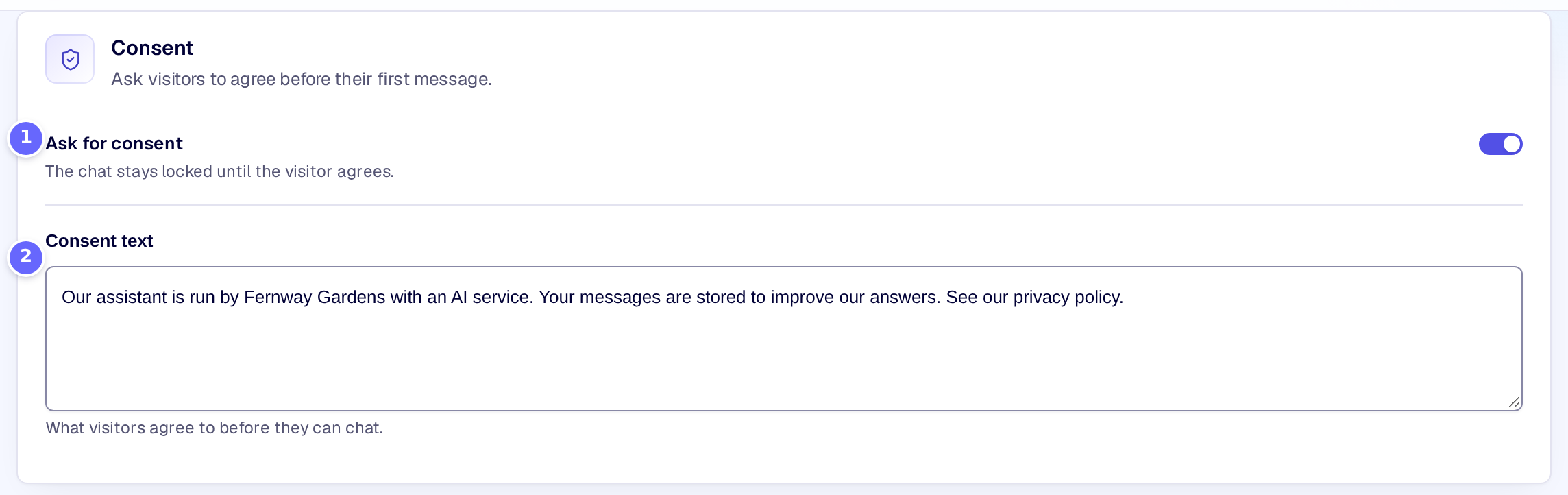
- Ask for consent locks the chat until the visitor agrees.
- Consent text is what the visitor reads and agrees to.
Visitors then see the consent text when they open the chat:
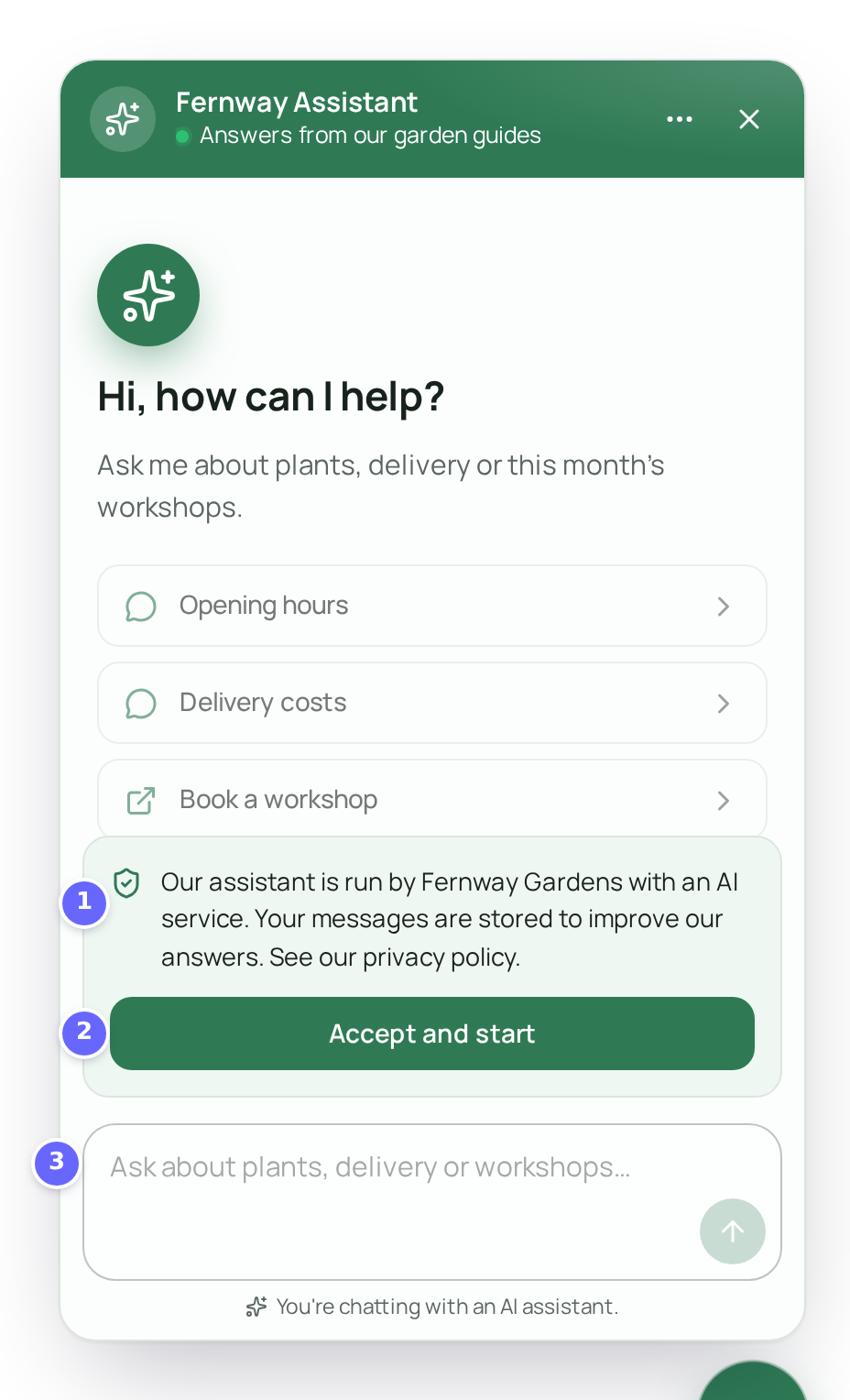
- Your consent text.
- Accept and start unlocks the chat.
- The message field waits until the visitor has accepted. A click on it points to the consent instead.
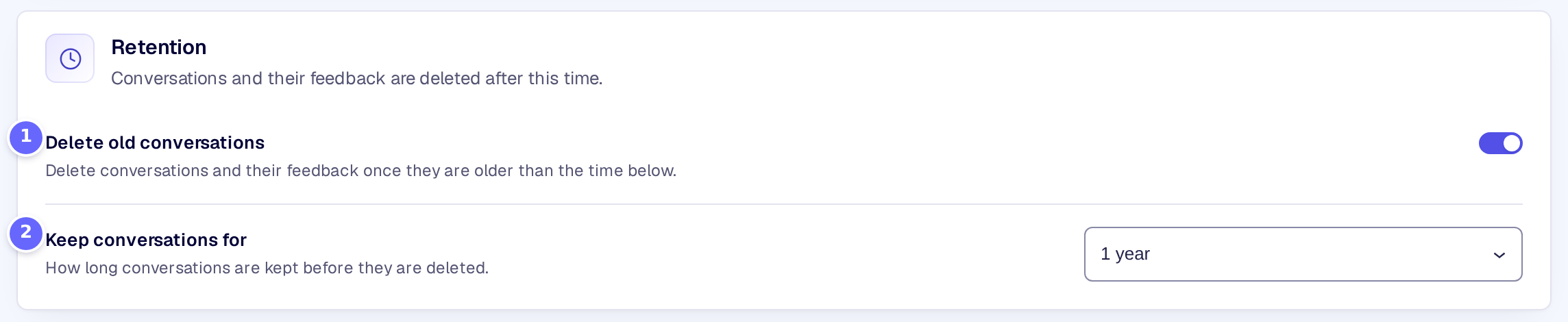
- Delete old conversations switches the automatic deletion on.
- Keep conversations for sets how long a conversation is kept after its last message.
Settings
Consent
| Setting | What it does |
|---|---|
| Ask for consent | Keeps the chat locked until the visitor accepts the consent text. |
| Consent text | What visitors agree to before they can chat. Shown while Ask for consent is on. Links, bold and lists are allowed. |
Personal data
| Setting | What it does |
|---|---|
| Mask card numbers and IBANs | Replaces payment card numbers and IBANs in visitors’ messages and in tool results before they reach the AI provider. They are not stored either. On by default. |
| Also mask emails and phone numbers | Also hides email addresses, phone numbers and IP addresses from the AI provider. The conversation history and handoffs keep them. Shown while the first one is on. |
Retention
| Setting | What it does |
|---|---|
| Delete old conversations | Deletes conversations and their feedback once they are older than the time you choose. |
| Keep conversations for | How long a conversation is kept: 6 months, 1 year, 2 years, 5 years, or a number of days you choose. |
| Custom retention (days) | The number of days, when Keep conversations for is Custom days. Without a valid number, nothing is deleted. |
The last section of the page, Blocked words and addresses, belongs to the guardrails: see Guardrails.
How it works
- Consent is remembered in the visitor’s browser (local storage). A visitor who clears their browser data, or uses another browser, is asked again.
- Masking happens before the AI provider. A card number counts only when it passes the card number checksum, and an IBAN only when its check digits are right, so order numbers and other long numbers stay as they are. Card numbers and IBANs are masked in the stored message too. Emails, phone numbers and IP addresses are hidden from the AI provider only: your conversation history keeps them. Long numbers, such as order numbers, may be taken for phone numbers.
- Old conversations are deleted once a day. A conversation goes when its last message is older than the time you chose, and its feedback goes with it. Developers can change the period with the kimaai_chatbot_session_retention_days filter.
Troubleshooting
- Visitors are not asked for consent. Your own browser may have accepted already: try a private window.
- Conversations are not deleted. Check that Delete old conversations is on, and with Custom days, that Custom retention (days) is a number of 1 or more. The deletion runs with WordPress’s scheduled tasks, so it needs visits to the site or a server cron job.
Related
- Guardrails: blocked words and IP addresses, banned terms and output checks.
- Chatbot history: the conversations the retention deletes.
- Export and import settings: what happens to the data when the plugin is deleted.