

A pinned answer is a question with an answer you verified. When a visitor asks that question, or something close to it, the chatbot answers from your facts instead of relying on what it finds in your content. It is the most reliable way to fix a wrong answer that keeps coming back, or to make sure a sensitive question always gets the same reply.
Set it up
Pinned answers compare questions by meaning, with the embedding model of your vector database. Connect one first: see Embeddings and sync. Until one is set up, the page shows a note that says so, with a link to Connections.
- In the KimaAI admin, go to Knowledge → Pinned answers.
- In the Matching section, turn on Use pinned answers and select Save changes.
- Select Pin an answer.
- Enter the Question as your visitors would ask it.
- Write the Verified answer: the facts the chatbot must use.
- Add Alternative phrasings (optional), one per line: other ways visitors ask the same thing.
- Select Add. The pinned answer is saved at once.
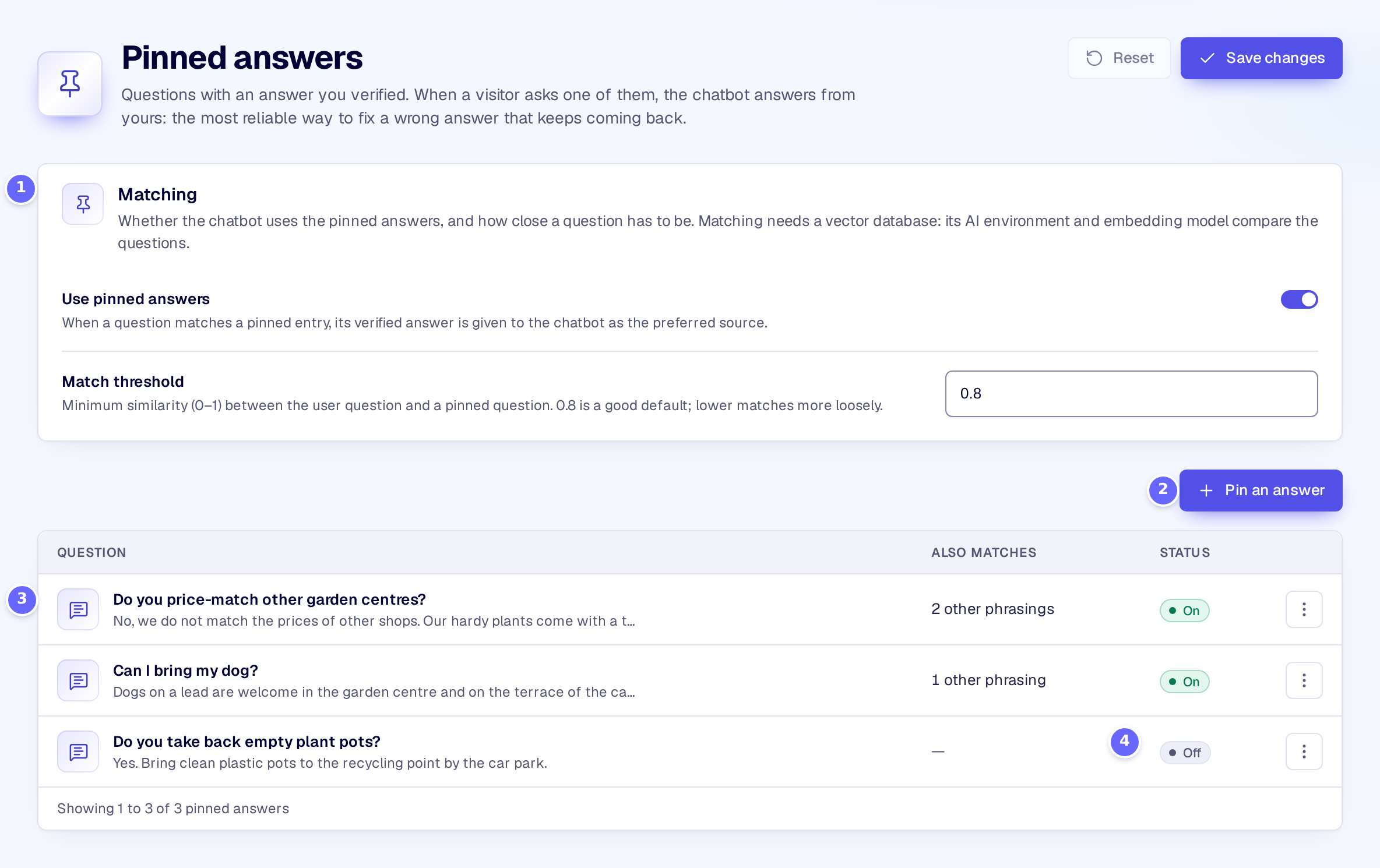
- Matching switches the pinned answers on and sets how close a question must be.
- Pin an answer adds a question and its answer.
- A pinned answer: the question, with the answer under it, and how many other phrasings it matches.
- Off: a pinned answer that is switched off is kept but never matched.
Select a pinned answer in the list to change it:
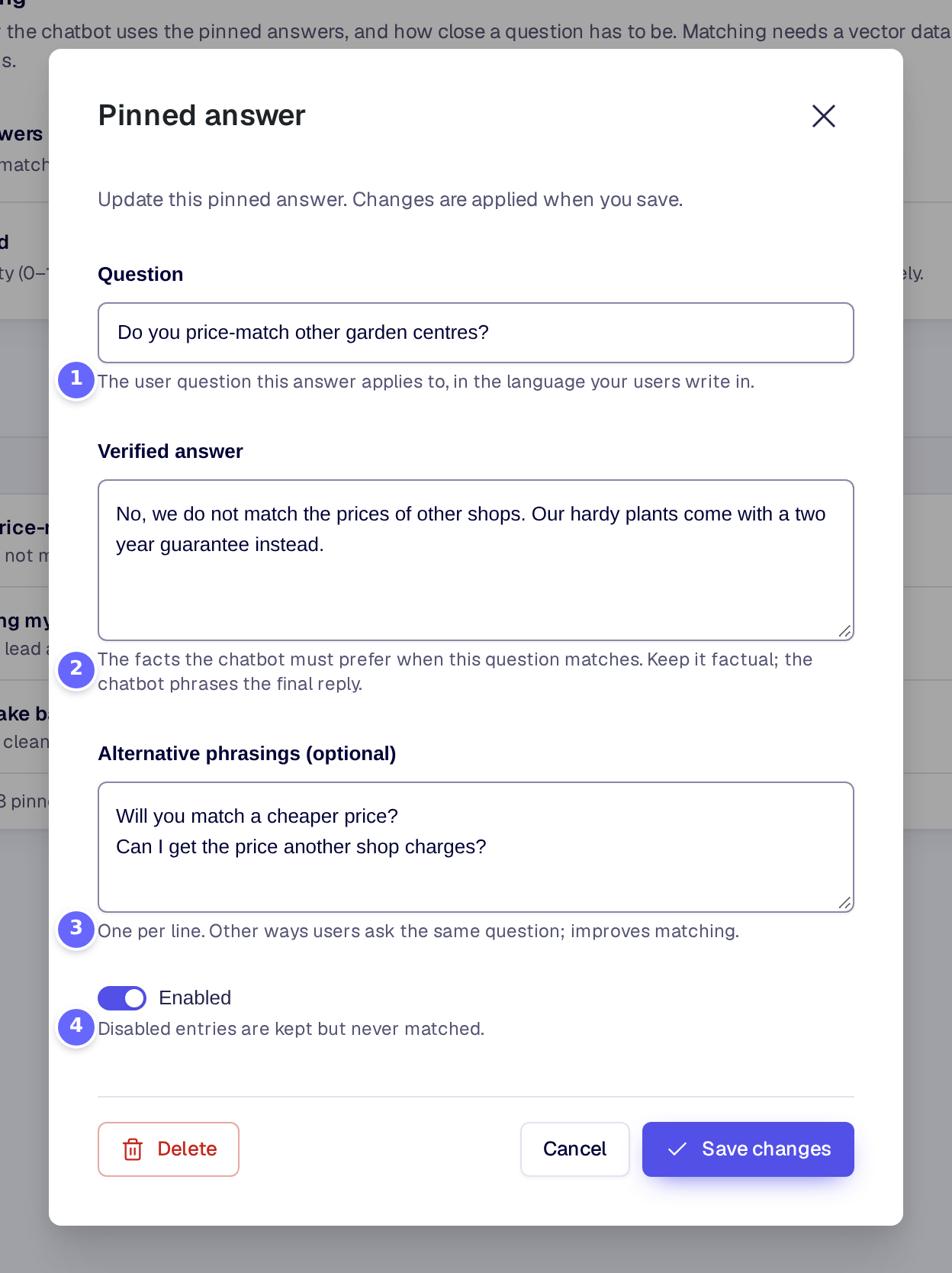
- Question: the question the answer is for.
- Verified answer: the facts the chatbot uses.
- Alternative phrasings (optional): more ways to ask it, one per line.
- Enabled switches the pinned answer on or off. Save changes saves it.
Settings
Matching
| Setting | What it does |
|---|---|
| Use pinned answers | Compares each question with your pinned answers, and gives the chatbot the verified answer of the closest match as its preferred source. It needs a vector database. |
| Match threshold | How similar a question must be to a pinned question or phrasing, from 0 to 1. The default is 0.8; a lower value matches more loosely. |
Pinned answer
| Setting | What it does |
|---|---|
| Question | The question the answer applies to, in the language your visitors write in. |
| Verified answer | The facts the chatbot must prefer when the question matches. On a multilingual site it can be translated. |
| Alternative phrasings (optional) | Other ways visitors ask the same question, one per line. Each line is matched like the question. |
| Enabled | A pinned answer that is switched off is kept in the list but never matched. |
How it works
- With each message, KimaAI compares the visitor’s latest message with the question and every phrasing of your pinned answers that are switched on. The comparison is by meaning (cosine similarity of their embeddings), so a question worded differently still matches.
- Only the closest pinned answer counts, and only when its score reaches the Match threshold. Its verified answer goes to the chatbot as a verified answer from your team, with the instruction to prefer these facts. The chatbot still writes the reply itself, in the conversation’s tone, so keep the verified answer factual.
- The knowledge base is still searched as usual: the pinned answer is added to what the chatbot knows, it does not replace it.
- The embeddings come from the AI environment and model of your first vector database for the current WordPress environment, on Connections → Vector databases. Only that model is used: the vector database itself is not searched.
- The question and phrasings are embedded once and kept until you change them or the embedding model. After a change, a request embeds at most five of them; the rest is done in the background.
- If the embeddings cannot be made, for example without a vector database, the chatbot answers without the pinned answers and KimaAI writes a warning to its log.
- The question and phrasings are the same in every language; only the verified answer is translated, with WPML or Polylang (Multilingual).
Troubleshooting
- A question does not match. Add the visitor’s wording as an alternative phrasing, or lower the Match threshold a little, for example to 0.75. Check the pinned answer is switched on.
- The wrong pinned answer matches. Raise the Match threshold, or make the questions of the two pinned answers more distinct.
- No pinned answer ever matches. Check that Use pinned answers is on and that a vector database with an AI environment and model is set up on Connections → Vector databases. Look for a warning in Logs.
Related
- Knowledge base: answers from all of your content.
- Glossary: the wording of your terms in every answer.
- Quality evaluation: check that the fixed answer stays right.