

The MCP server lets an AI agent, such as Claude Code or Codex, work with your chatbot over the Model Context Protocol. The agent can read the usage figures, the feedback and the questions visitors ask most, test a question against the chatbot and see which content it found. With the right access it can also change settings, run quality checks and sync content again.
The endpoint is off until you switch it on, and each agent connects with a token whose scopes say what it may do.
Set it up
- In the KimaAI admin, go to Settings → MCP server. You find it on Connections too, as the MCP server card under Plugins and agents.
- Under Connection, turn on Enable the MCP endpoint.
- Choose the Environment: Production for your live site, Staging for a copy.
- Under Access tokens, give the token a Label, such as the agent’s name.
- Tick the Scopes the agent needs. read is enough to look and diagnose.
- Select Create token, and copy the token at once: it is shown only this one time.
- Connect the agent with the command under How to connect, with your token in place of
<token>.
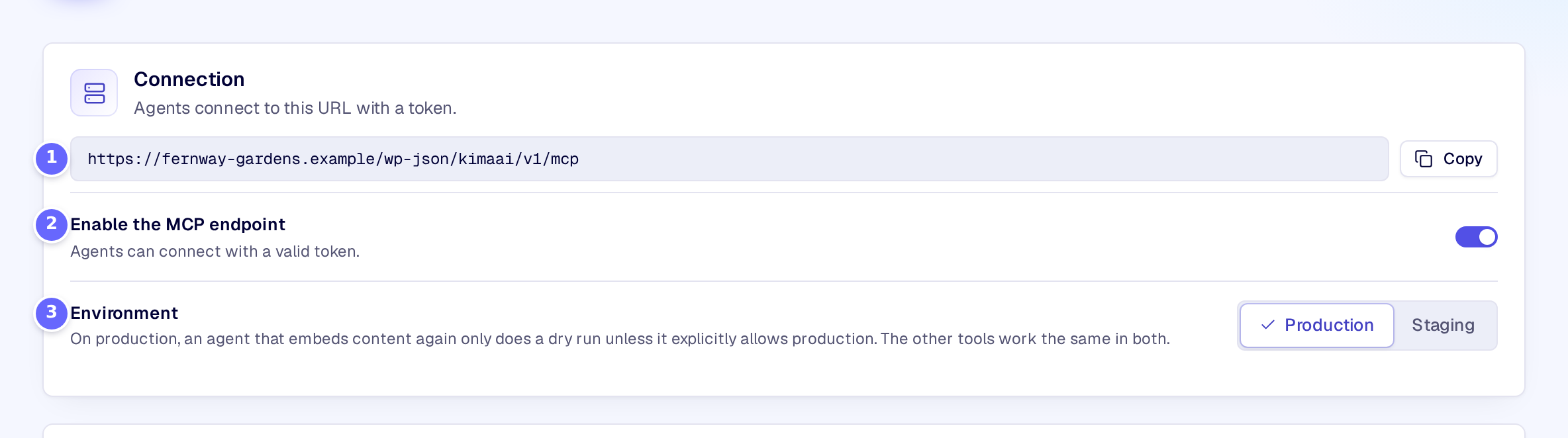
- The endpoint’s address, which the agent connects to. The button beside it copies it.
- Enable the MCP endpoint: while it is off, the endpoint refuses every request.
- Environment: on Production, an agent that embeds content again only does a dry run, unless it asks for production explicitly.
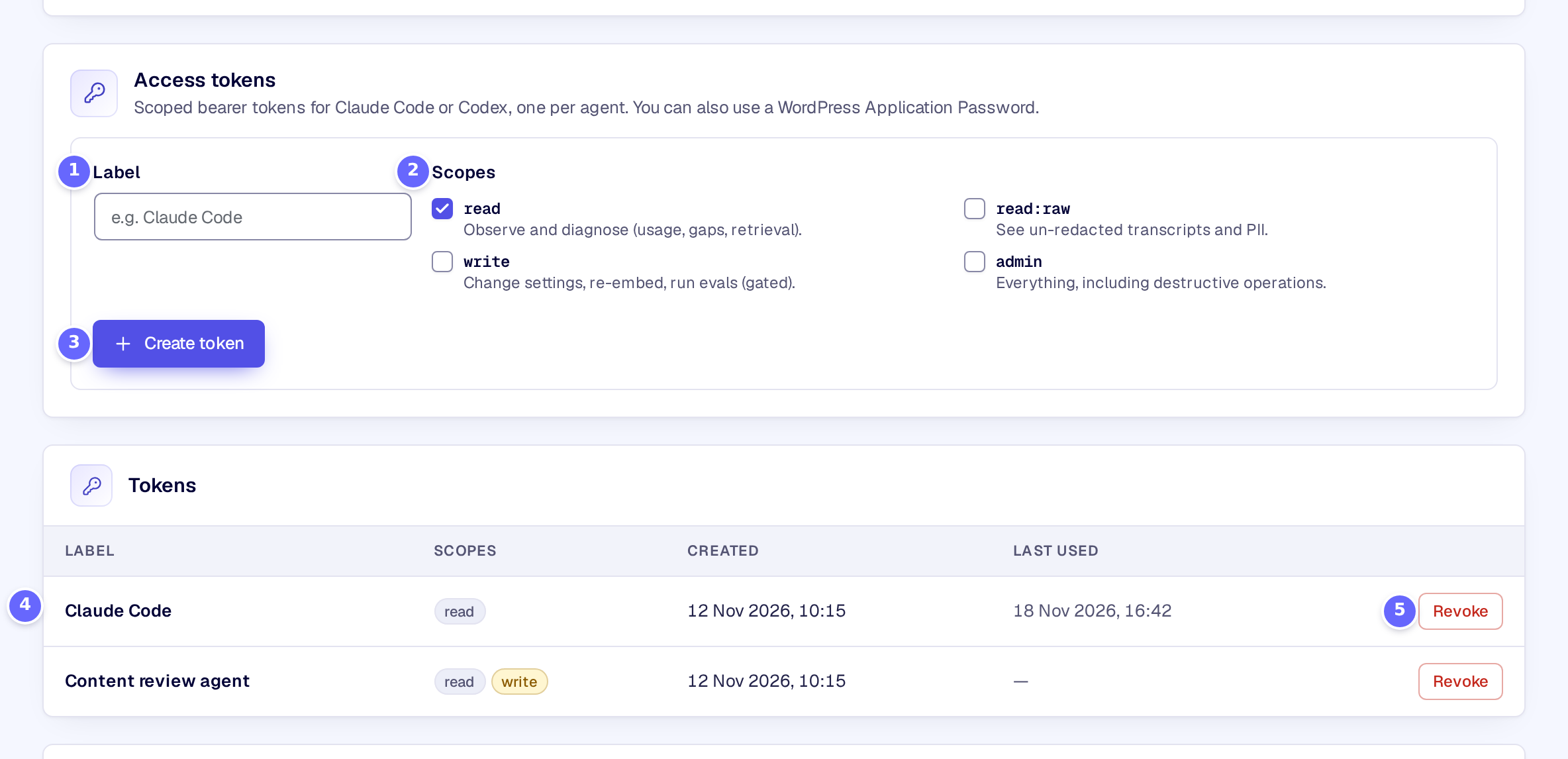
- Label: a name for the token, so you know which agent uses it.
- Scopes: what the token allows.
- Create token makes the token and shows it once.
- Each token with its scopes, when it was created and when an agent last used it. The token itself is never shown again.
- Revoke removes a token: the agent that uses it loses access at once.
How it works
The page’s options are saved as soon as you change them; it has no Save button.
| Option | What it does |
|---|---|
| Enable the MCP endpoint | Opens the endpoint to agents with a valid token. While it is off, every request is refused. Off on a new site. |
| Environment | Production or Staging. On production, an agent that embeds content again only does a dry run, unless it asks for production explicitly. The other tools work the same in both. |
| Label | The token’s name in the list of tokens. Without one, the token is called “MCP token”. |
| Scopes | What the token allows, below. |
A token has one or more scopes:
| Scope | What the agent may do |
|---|---|
read | Look and diagnose: usage, feedback, the questions visitors ask, conversations with personal data masked, retrieval tests. |
read:raw | Read conversations without masking, personal data included. |
write | Change settings, add and run quality checks, sync content again. |
admin | Everything above. |
writeandread:rawincluderead. An agent sees only the tools its token’s scopes allow.- A setting changed through
update_settingsis shown first as a preview; the agent applies it in a second step and can roll it back. - Tokens are stored as a salted hash, so even someone who reads your database cannot use them. A token acts as the administrator who created it, and stops working when that user loses the
kimaai_mcpcapability, which administrators get by default. - Instead of a token, an agent can connect with a WordPress Application Password (Users → Profile) and Basic authentication. An administrator connected this way has every scope.
- Tokens can also be created, listed and revoked with WP-CLI (see WP-CLI commands).
- Every tool an agent calls is written to the MCP audit log, with the token’s label.
The tools, their scopes and their arguments are listed in the MCP tools reference.
Troubleshooting
- The agent gets “The MCP endpoint is disabled.” Turn on Enable the MCP endpoint.
- The agent cannot authenticate. Check that the token was copied whole, that it was not revoked, and that it is sent as
Authorization: Bearer <token>. If you lost the token, revoke it and create a new one. - A yellow note says your account does not hold the MCP capability. Your user lacks
kimaai_mcp, so tokens you create do not work. Ask an administrator to grant it. - The agent cannot change anything. Its token has only
read. Create one withwrite.
Related
- MCP tools reference: every tool, its scope and its arguments.
- Quality evaluation: the quality checks an agent can run.
- Cost observability: the usage figures an agent can read.
- WP-CLI commands: managing tokens from the command line.